Papercraft Manual
User-facing documentation for Papercraft XML templates and the X39.Solutions.PdfTemplate compatibility bridge.
Complete Examples
| Previous: Template language | Manual home | Next: Troubleshooting |
What Is This?
Complete examples are larger templates that show several concepts working together in one document. They are different from task examples because they demonstrate an end-to-end document shape, such as an invoice or report.
When Should I Use This?
Use this chapter when you already understand the basic controls and want to see how a whole document is assembled. Complete examples should be useful as reading material, not as a replacement for the smaller concept and task pages.
How Do I Start?
Start with the example closest to your document type, then follow links back to the smaller chapters for individual concepts.
Invoice Example
Use this example when you need a compact invoice with a header, address blocks, a line-item table, alternating row colors, totals and a footer page number. It uses literal example values so the complete layout stays easy to read. If your application supplies invoice values, replace the literal text with variables after the data shape is agreed with the application developer.
<?xml version="1.0" encoding="utf-8"?>
<template>
    <template.style>
        <text fontsize="9" foreground="#111827"/>
    </template.style>
    <header>
        <text fontsize="20" weight="bold">Invoice INV-1007</text>
        <text foreground="#475569">Issued 2026-05-27 | Due 2026-06-26</text>
        <line thickness="1pt" length="100%" color="#cbd5e1" margin="0 2mm 0 0"/>
    </header>
    <body>
        <table margin="0 0 0 5mm">
            <tr>
                <td width="1*">
                    <border background="#f8fafc" padding="2mm" margin="0 0 2mm 0">
                        <text fontsize="8" foreground="#475569">From</text>
                        <text weight="bold">Northwind Design Studio</text>
                        <text>100 Market Street</text>
                        <text>Springfield, IL 62701</text>
                    </border>
                </td>
                <td width="1*">
                    <border background="#eff6ff" padding="2mm">
                        <text fontsize="8" foreground="#475569">Bill to</text>
                        <text weight="bold">Mira Silva</text>
                        <text>24 River Road</text>
                        <text>Madison, WI 53703</text>
                    </border>
                </td>
            </tr>
        </table>

        <text fontsize="11" weight="bold" margin="0 0 0 1mm">Line items</text>
        <table>
            <th borderThickness="0 0 0 1pt" borderColor="#334155">
                <td width="2*" padding="1mm">
                    <text weight="bold">Description</text>
                </td>
                <td width="1*" padding="1mm">
                    <text weight="bold" horizontalAlignment="right">Qty</text>
                </td>
                <td width="1*" padding="1mm">
                    <text weight="bold" horizontalAlignment="right">Amount</text>
                </td>
            </th>
            @alternate on RowBackground with ["#ffffff", "#f8fafc"] {
            <tr background="@RowBackground">
                <td padding="1mm"><text>Template design</text></td>
                <td padding="1mm"><text horizontalAlignment="right">1</text></td>
                <td padding="1mm"><text horizontalAlignment="right">450.00</text></td>
            </tr>
            }
            @alternate on RowBackground {
            <tr background="@RowBackground">
                <td padding="1mm"><text>Review workshop</text></td>
                <td padding="1mm"><text horizontalAlignment="right">2</text></td>
                <td padding="1mm"><text horizontalAlignment="right">240.00</text></td>
            </tr>
            }
            @alternate on RowBackground {
            <tr background="@RowBackground">
                <td padding="1mm"><text>Print-ready adjustments</text></td>
                <td padding="1mm"><text horizontalAlignment="right">1</text></td>
                <td padding="1mm"><text horizontalAlignment="right">275.00</text></td>
            </tr>
            }
        </table>

        <text margin="0 5mm 0 0" horizontalAlignment="right">Subtotal 965.00</text>
        <text horizontalAlignment="right">Tax 77.20</text>
        <line thickness="1pt" length="35mm" color="#111827" horizontalAlignment="right" margin="0 1mm"/>
        <text weight="bold" horizontalAlignment="right">Total 1042.20</text>
    </body>
    <footer>
        <line thickness="1pt" length="100%" color="#cbd5e1" margin="0 0 0 1mm"/>
        <pageNumber
            mode="CurrentTotal"
            prefix="Page "
            delimiter=" of "
            fontsize="8"
            foreground="#64748b"
            horizontalAlignment="right"/>
    </footer>
</template>
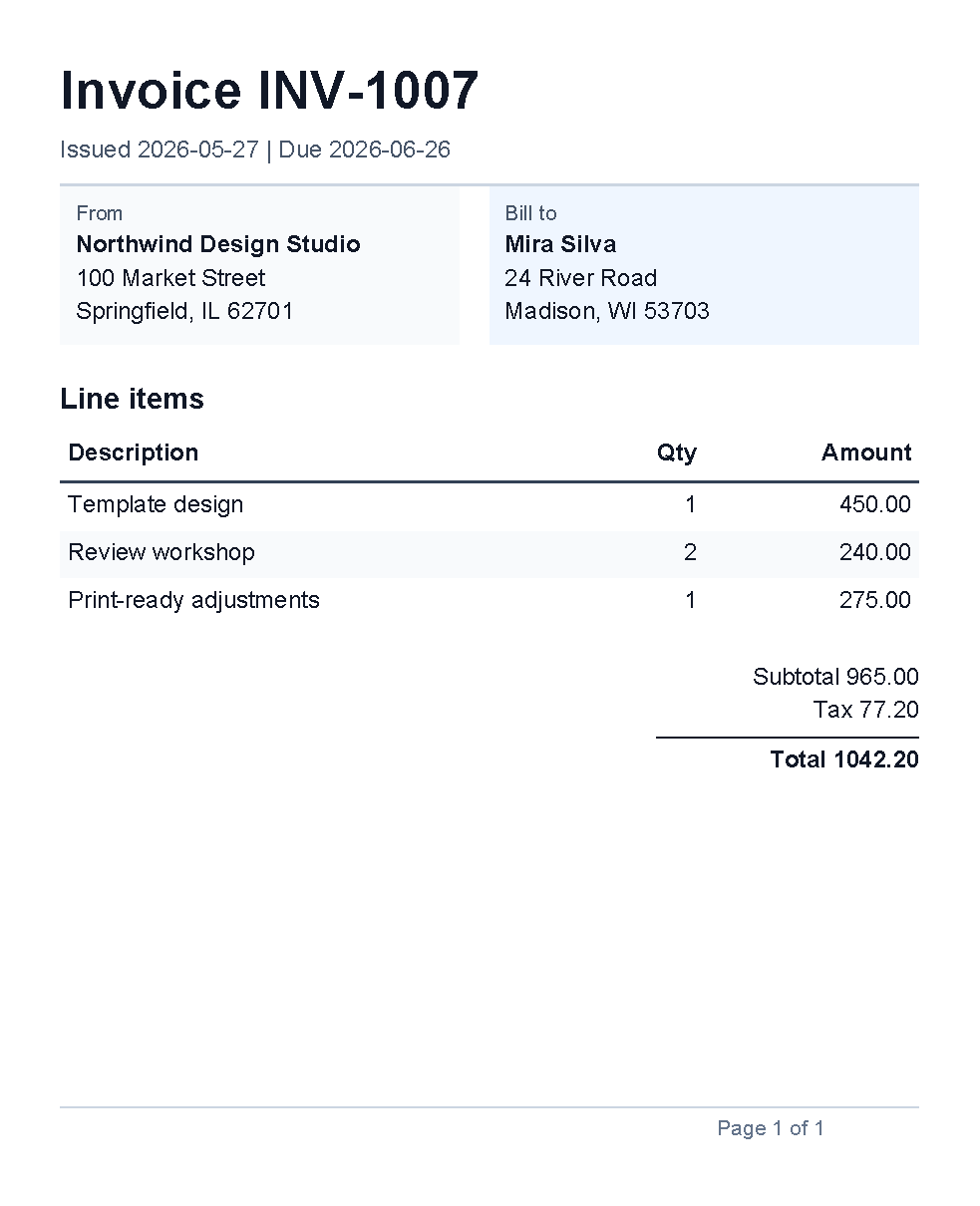
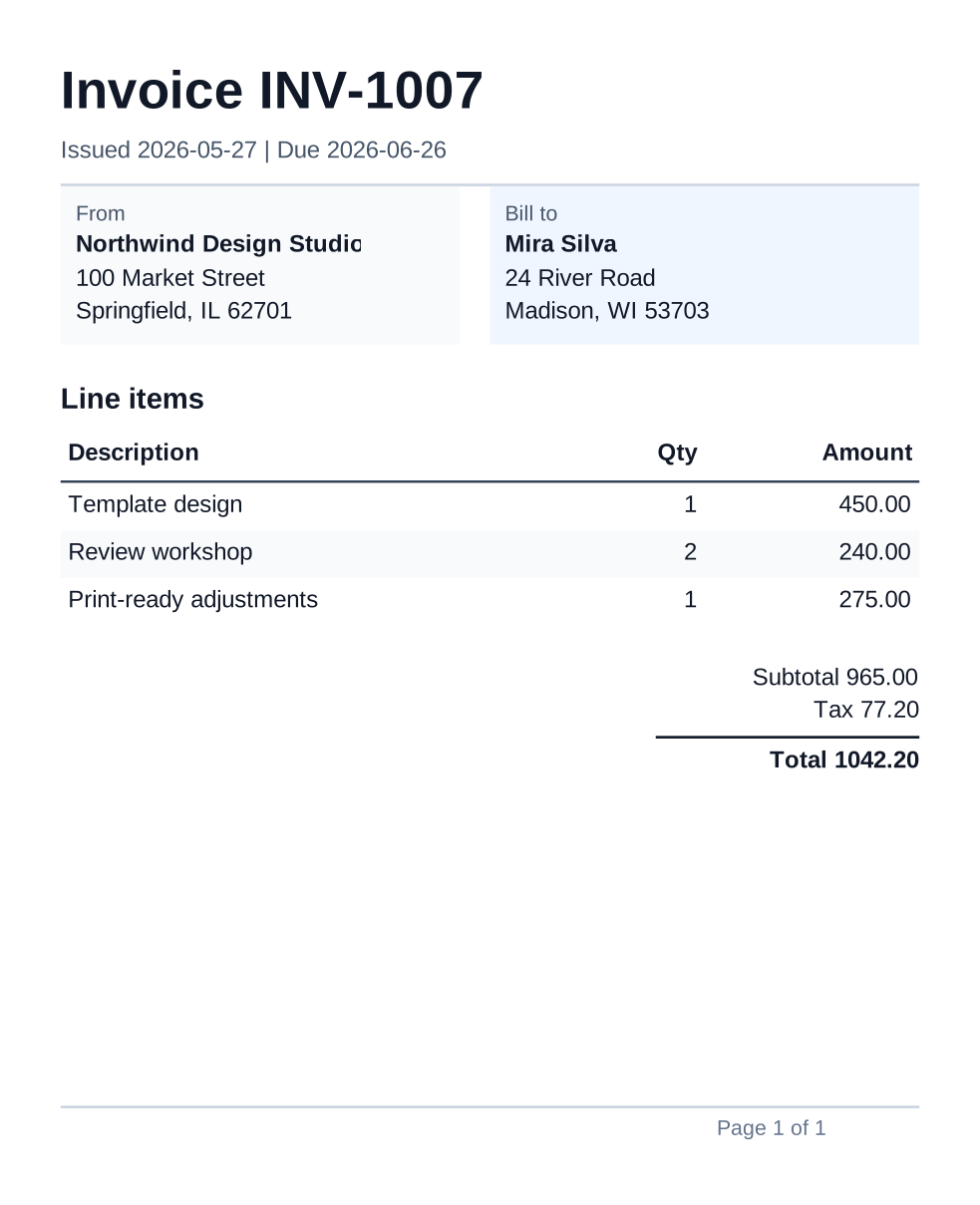
This example combines smaller topics from First document, Styles, Border control, Line control, Table control, Page number control and Template language.
Report Example
Use this example when you need a short report page with a repeated header, a footer page number, summary cards, a status table and a small action list. It keeps the data literal so the layout is clear before you connect it to application data.
<?xml version="1.0" encoding="utf-8"?>
<template>
    <template.style>
        <text fontsize="9" foreground="#0f172a"/>
    </template.style>
    <header>
        <text fontsize="18" weight="bold">Operations report</text>
        <text foreground="#475569">May 2026 summary</text>
        <line thickness="1pt" length="100%" color="#cbd5e1" margin="0 2mm 0 0"/>
    </header>
    <body>
        <border background="#f8fafc" padding="2mm" margin="0 0 0 5mm" verticalAlignment="top">
            <text fontsize="8" foreground="#475569">Overview</text>
            <text>Orders increased while open support items stayed stable.</text>
        </border>

        <table margin="0 0 0 5mm">
            <tr>
                <td width="1*">
                    <border background="#ecfeff" padding="2mm" margin="0 0 1mm 0">
                        <text fontsize="8" foreground="#475569">Orders</text>
                        <text fontsize="16" weight="bold">128</text>
                    </border>
                </td>
                <td width="1*">
                    <border background="#f0fdf4" padding="2mm" margin="0 0 1mm 0">
                        <text fontsize="8" foreground="#475569">Shipments</text>
                        <text fontsize="16" weight="bold">117</text>
                    </border>
                </td>
                <td width="1*">
                    <border background="#fefce8" padding="2mm">
                        <text fontsize="8" foreground="#475569">Open items</text>
                        <text fontsize="16" weight="bold">9</text>
                    </border>
                </td>
            </tr>
        </table>

        <text fontsize="11" weight="bold" margin="0 0 0 1mm">Highlights</text>
        <table>
            <th borderThickness="0 0 0 1pt" borderColor="#334155">
                <td width="2*" padding="1mm">
                    <text weight="bold">Area</text>
                </td>
                <td width="2*" padding="1mm">
                    <text weight="bold">Status</text>
                </td>
                <td width="1*" padding="1mm">
                    <text weight="bold" horizontalAlignment="right">Owner</text>
                </td>
            </th>
            <tr>
                <td padding="1mm"><text>Warehouse</text></td>
                <td padding="1mm"><text>Picking time improved</text></td>
                <td padding="1mm"><text horizontalAlignment="right">Ava</text></td>
            </tr>
            <tr background="#f8fafc">
                <td padding="1mm"><text>Support</text></td>
                <td padding="1mm"><text>Backlog unchanged</text></td>
                <td padding="1mm"><text horizontalAlignment="right">Noah</text></td>
            </tr>
            <tr>
                <td padding="1mm"><text>Billing</text></td>
                <td padding="1mm"><text>All invoices sent</text></td>
                <td padding="1mm"><text horizontalAlignment="right">Mira</text></td>
            </tr>
        </table>

        <text fontsize="11" weight="bold" margin="0 4mm 0 1mm">Next actions</text>
        <text>Finalize the supplier review.</text>
        <text>Confirm support staffing for June.</text>
        <text>Prepare the next billing export.</text>
    </body>
    <footer>
        <line thickness="1pt" length="100%" color="#cbd5e1" margin="0 0 0 1mm"/>
        <pageNumber
            mode="CurrentTotal"
            prefix="Operations report | Page "
            delimiter=" of "
            fontsize="8"
            foreground="#64748b"
            horizontalAlignment="right"/>
    </footer>
</template>
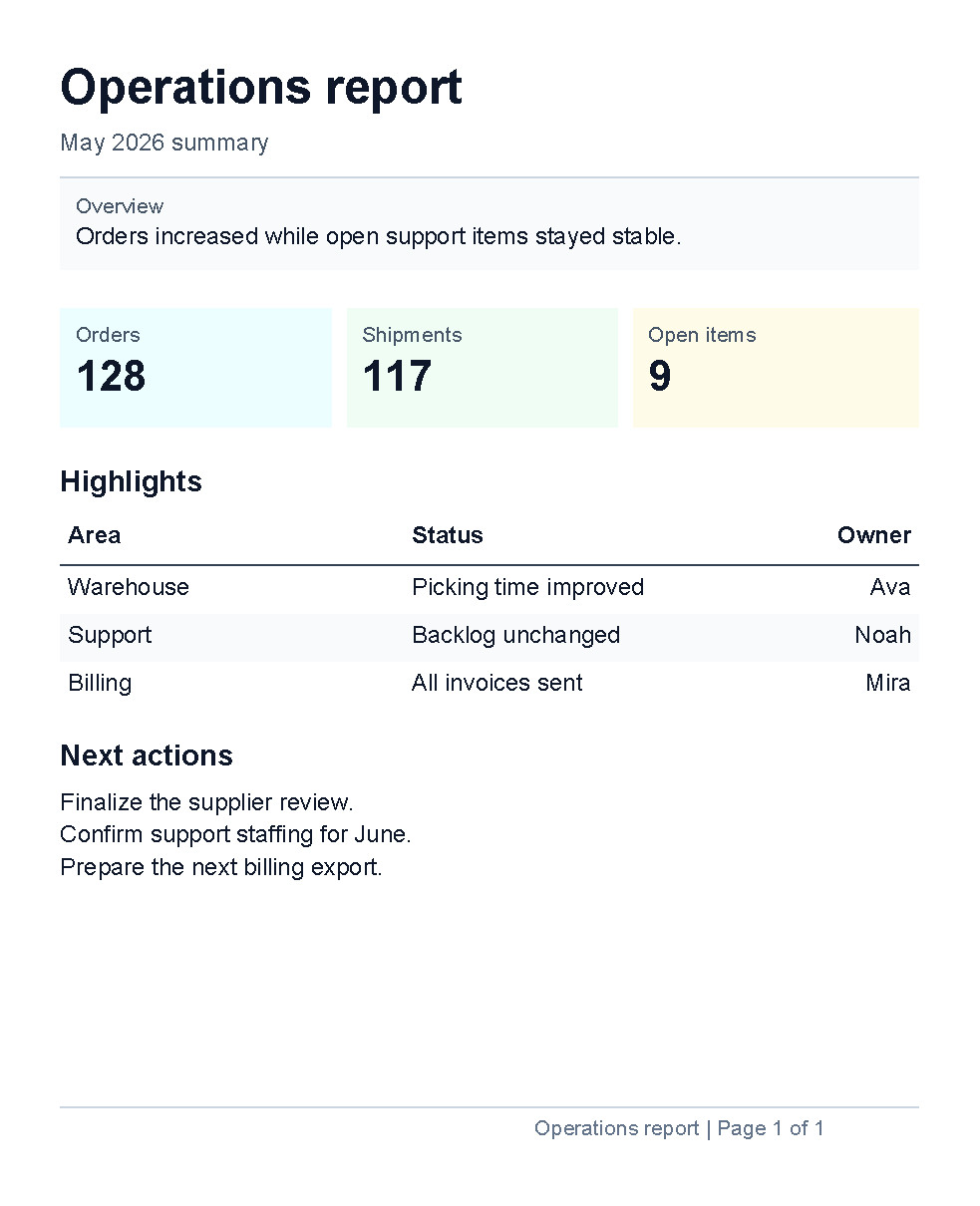
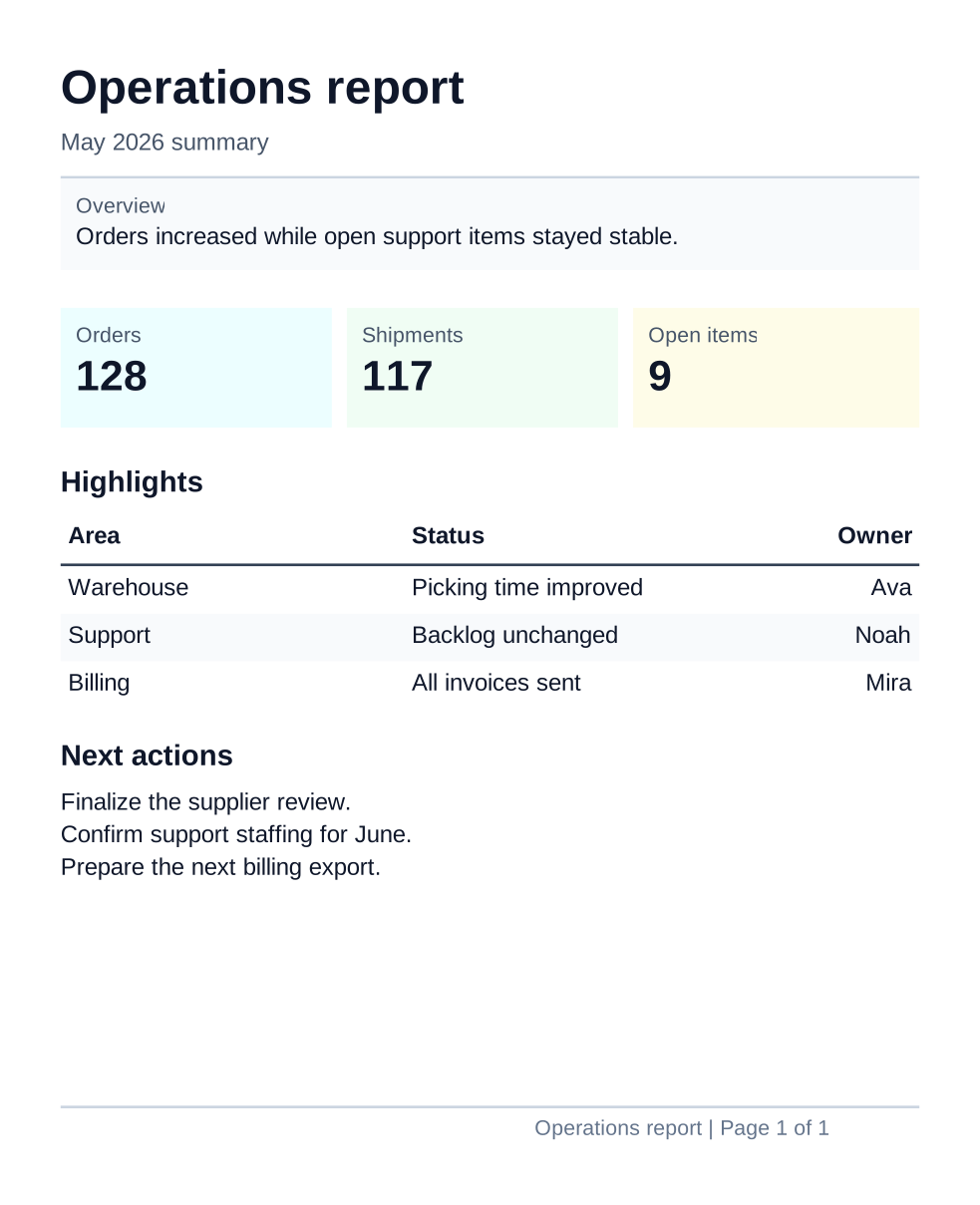
This example combines smaller topics from First document, Border control, Line control, Table control and Page number control.
Table-Heavy Example
Use this example when the document is mostly a dense table, such as a stock count, checklist or review sheet. It demonstrates summary rows, fixed and flexible column widths, right-aligned numbers, repeated headers and alternating row backgrounds.
<?xml version="1.0" encoding="utf-8"?>
<template>
    <template.style>
        <text fontsize="8" foreground="#0f172a"/>
    </template.style>
    <header>
        <text fontsize="18" weight="bold">Warehouse count sheet</text>
        <text foreground="#475569">Prepared 2026-05-27 | Morning count</text>
        <line thickness="1pt" length="100%" color="#cbd5e1" margin="0 2mm 0 0"/>
    </header>
    <body>
        <border background="#f8fafc" padding="2mm" margin="0 0 0 4mm" verticalAlignment="top">
            <text fontsize="8" foreground="#475569">Use case</text>
            <text>Use this layout for dense review tables with repeated labels, quantities and status notes.</text>
        </border>

        <table margin="0 0 0 4mm">
            <tr>
                <td width="1*">
                    <border background="#ecfeff" padding="2mm" margin="0 0 1mm 0">
                        <text fontsize="8" foreground="#475569">Rows checked</text>
                        <text fontsize="15" weight="bold">8</text>
                    </border>
                </td>
                <td width="1*">
                    <border background="#f0fdf4" padding="2mm" margin="0 0 1mm 0">
                        <text fontsize="8" foreground="#475569">Matched</text>
                        <text fontsize="15" weight="bold">5</text>
                    </border>
                </td>
                <td width="1*">
                    <border background="#fefce8" padding="2mm">
                        <text fontsize="8" foreground="#475569">Needs review</text>
                        <text fontsize="15" weight="bold">3</text>
                    </border>
                </td>
            </tr>
        </table>

        <text fontsize="11" weight="bold" margin="0 0 0 1mm">Count detail</text>
        <table>
            <th borderThickness="0 0 0 1pt" borderColor="#334155">
                <td width="14mm" padding="1mm">
                    <text weight="bold">Zone</text>
                </td>
                <td width="2*" padding="1mm">
                    <text weight="bold">Item</text>
                </td>
                <td width="17mm" padding="1mm">
                    <text weight="bold" horizontalAlignment="right">Expected</text>
                </td>
                <td width="17mm" padding="1mm">
                    <text weight="bold" horizontalAlignment="right">Counted</text>
                </td>
                <td width="14mm" padding="1mm">
                    <text weight="bold" horizontalAlignment="right">Diff</text>
                </td>
                <td width="22mm" padding="1mm">
                    <text weight="bold" horizontalAlignment="right">Status</text>
                </td>
            </th>
            @alternate on RowBackground with ["#ffffff", "#f8fafc"] {
            <tr background="@RowBackground">
                <td padding="1mm"><text>A1</text></td>
                <td padding="1mm"><text>Sensor gateway</text></td>
                <td padding="1mm"><text horizontalAlignment="right">48</text></td>
                <td padding="1mm"><text horizontalAlignment="right">48</text></td>
                <td padding="1mm"><text horizontalAlignment="right">0</text></td>
                <td padding="1mm"><text horizontalAlignment="right">Ready</text></td>
            </tr>
            }
            @alternate on RowBackground {
            <tr background="@RowBackground">
                <td padding="1mm"><text>A2</text></td>
                <td padding="1mm"><text>Mounting rail</text></td>
                <td padding="1mm"><text horizontalAlignment="right">30</text></td>
                <td padding="1mm"><text horizontalAlignment="right">28</text></td>
                <td padding="1mm"><text horizontalAlignment="right">-2</text></td>
                <td padding="1mm"><text horizontalAlignment="right">Review</text></td>
            </tr>
            }
            @alternate on RowBackground {
            <tr background="@RowBackground">
                <td padding="1mm"><text>B1</text></td>
                <td padding="1mm"><text>Setup card</text></td>
                <td padding="1mm"><text horizontalAlignment="right">80</text></td>
                <td padding="1mm"><text horizontalAlignment="right">80</text></td>
                <td padding="1mm"><text horizontalAlignment="right">0</text></td>
                <td padding="1mm"><text horizontalAlignment="right">Ready</text></td>
            </tr>
            }
            @alternate on RowBackground {
            <tr background="@RowBackground">
                <td padding="1mm"><text>B2</text></td>
                <td padding="1mm"><text>Power adapter</text></td>
                <td padding="1mm"><text horizontalAlignment="right">64</text></td>
                <td padding="1mm"><text horizontalAlignment="right">64</text></td>
                <td padding="1mm"><text horizontalAlignment="right">0</text></td>
                <td padding="1mm"><text horizontalAlignment="right">Ready</text></td>
            </tr>
            }
            @alternate on RowBackground {
            <tr background="@RowBackground">
                <td padding="1mm"><text>C1</text></td>
                <td padding="1mm"><text>Wireless sensor</text></td>
                <td padding="1mm"><text horizontalAlignment="right">96</text></td>
                <td padding="1mm"><text horizontalAlignment="right">92</text></td>
                <td padding="1mm"><text horizontalAlignment="right">-4</text></td>
                <td padding="1mm"><text horizontalAlignment="right">Review</text></td>
            </tr>
            }
            @alternate on RowBackground {
            <tr background="@RowBackground">
                <td padding="1mm"><text>C2</text></td>
                <td padding="1mm"><text>Label roll</text></td>
                <td padding="1mm"><text horizontalAlignment="right">12</text></td>
                <td padding="1mm"><text horizontalAlignment="right">12</text></td>
                <td padding="1mm"><text horizontalAlignment="right">0</text></td>
                <td padding="1mm"><text horizontalAlignment="right">Ready</text></td>
            </tr>
            }
            @alternate on RowBackground {
            <tr background="@RowBackground">
                <td padding="1mm"><text>D1</text></td>
                <td padding="1mm"><text>Battery pack</text></td>
                <td padding="1mm"><text horizontalAlignment="right">40</text></td>
                <td padding="1mm"><text horizontalAlignment="right">41</text></td>
                <td padding="1mm"><text horizontalAlignment="right">+1</text></td>
                <td padding="1mm"><text horizontalAlignment="right">Review</text></td>
            </tr>
            }
            @alternate on RowBackground {
            <tr background="@RowBackground">
                <td padding="1mm"><text>D2</text></td>
                <td padding="1mm"><text>Shipping insert</text></td>
                <td padding="1mm"><text horizontalAlignment="right">75</text></td>
                <td padding="1mm"><text horizontalAlignment="right">75</text></td>
                <td padding="1mm"><text horizontalAlignment="right">0</text></td>
                <td padding="1mm"><text horizontalAlignment="right">Ready</text></td>
            </tr>
            }
        </table>
    </body>
    <footer>
        <line thickness="1pt" length="100%" color="#cbd5e1" margin="0 0 0 1mm"/>
        <pageNumber
            mode="CurrentTotal"
            prefix="Warehouse count | Page "
            delimiter=" of "
            fontsize="8"
            foreground="#64748b"
            horizontalAlignment="right"/>
    </footer>
</template>
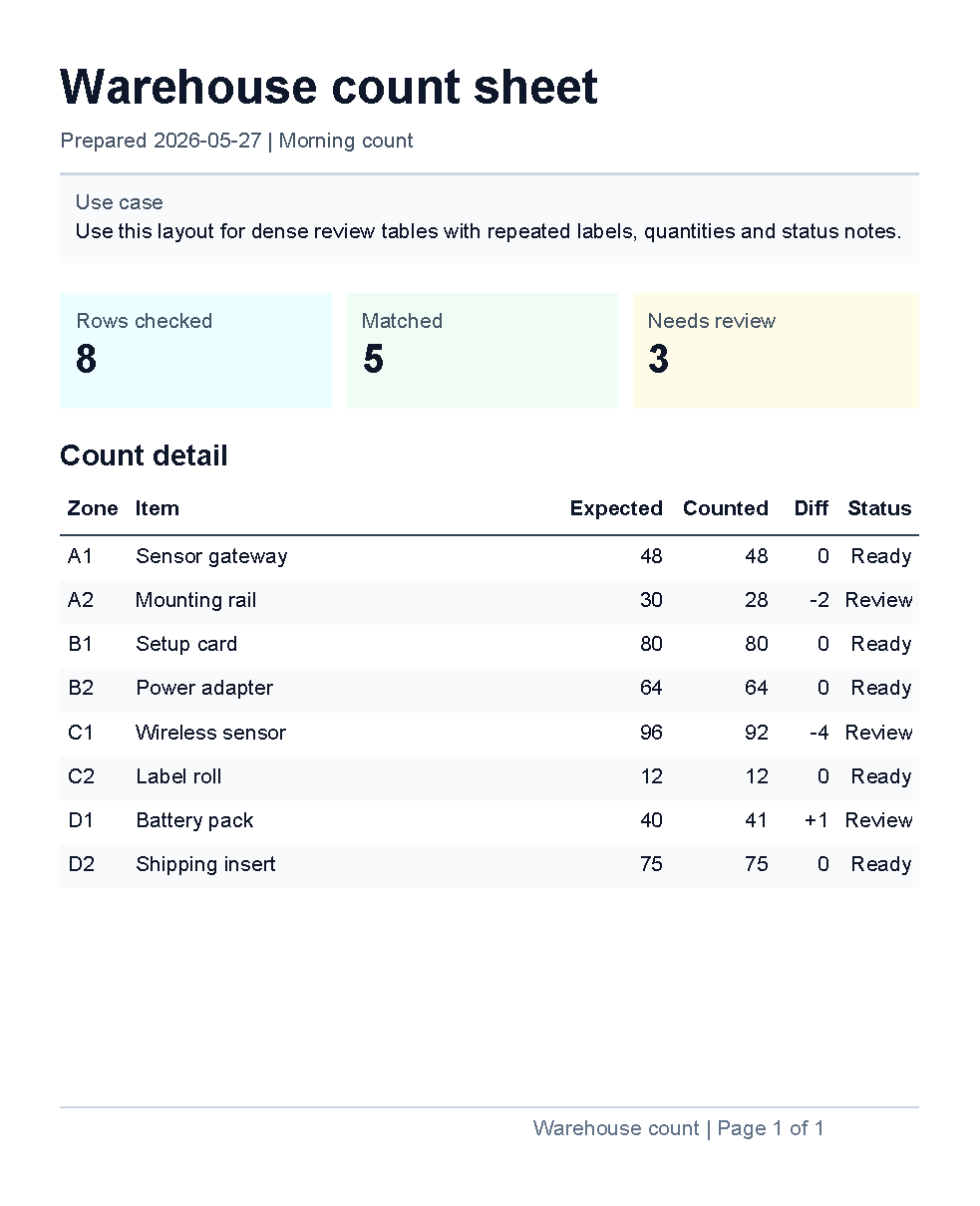
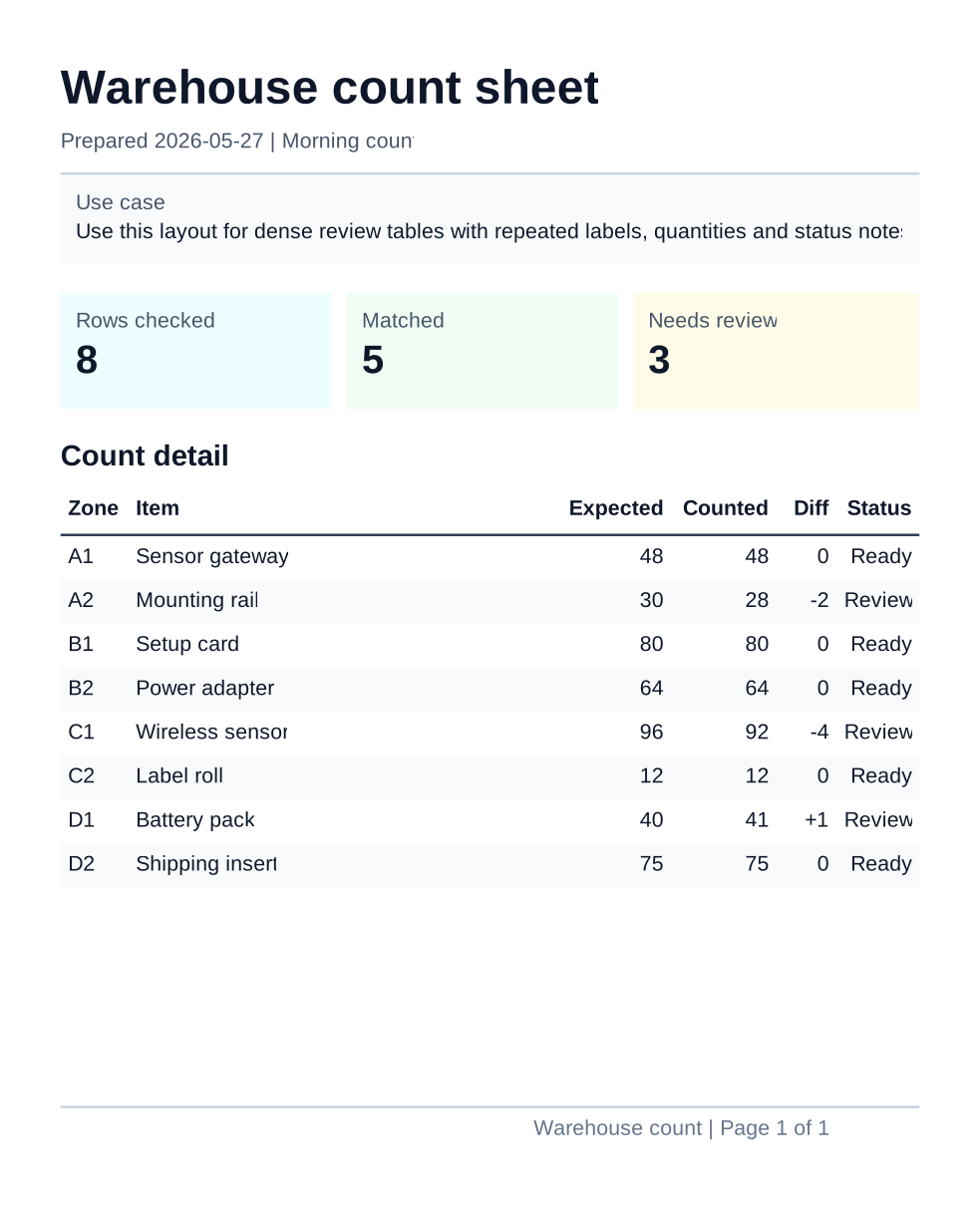
This example combines smaller topics from First document, Layout fundamentals, Border control, Table control, Page number control and Template language.
Product Sheet Example
Use this example when you need a branded one-page handout with a logo or product image, short descriptive text,
a small table and a footer page number.
It uses one image value supplied by the application as LogoImage.
<?xml version="1.0" encoding="utf-8"?>
<template>
    <template.style>
        <text fontsize="9" foreground="#0f172a"/>
    </template.style>
    <header>
        <table>
            <tr>
                <td width="28mm">
                    <image
                        source="@LogoImage"
                        width="24mm"
                        height="14mm"
                        horizontalAlignment="left"
                        verticalAlignment="top"/>
                </td>
                <td width="2*">
                    <text fontsize="18" weight="bold">Product sheet</text>
                    <text foreground="#475569">Compact sensor kit</text>
                </td>
            </tr>
        </table>
        <line thickness="1pt" length="100%" color="#cbd5e1" margin="0 2mm 0 0"/>
    </header>
    <body>
        <border background="#f8fafc" padding="2mm" margin="0 0 0 5mm" verticalAlignment="top">
            <text fontsize="8" foreground="#475569">Overview</text>
            <text>The kit combines a small gateway, two wireless sensors and a ready-to-print setup card.</text>
        </border>

        <text fontsize="11" weight="bold" margin="0 5mm 0 1mm">Package contents</text>
        <table>
            <th borderThickness="0 0 0 1pt" borderColor="#334155">
                <td width="2*" padding="1mm">
                    <text weight="bold">Item</text>
                </td>
                <td width="1*" padding="1mm">
                    <text weight="bold" horizontalAlignment="right">Qty</text>
                </td>
            </th>
            <tr>
                <td padding="1mm"><text>Gateway unit</text></td>
                <td padding="1mm"><text horizontalAlignment="right">1</text></td>
            </tr>
            <tr background="#f8fafc">
                <td padding="1mm"><text>Wireless sensors</text></td>
                <td padding="1mm"><text horizontalAlignment="right">2</text></td>
            </tr>
            <tr>
                <td padding="1mm"><text>Setup card</text></td>
                <td padding="1mm"><text horizontalAlignment="right">1</text></td>
            </tr>
        </table>

        <text fontsize="11" weight="bold" margin="0 5mm 0 1mm">Best fit</text>
        <border background="#eff6ff" padding="2mm" verticalAlignment="top">
            <text>Use this layout for datasheets, product inserts and branded one-page handouts.</text>
        </border>
    </body>
    <footer>
        <line thickness="1pt" length="100%" color="#cbd5e1" margin="0 0 0 1mm"/>
        <pageNumber
            mode="CurrentTotal"
            prefix="Product sheet | Page "
            delimiter=" of "
            fontsize="8"
            foreground="#64748b"
            horizontalAlignment="right"/>
    </footer>
</template>
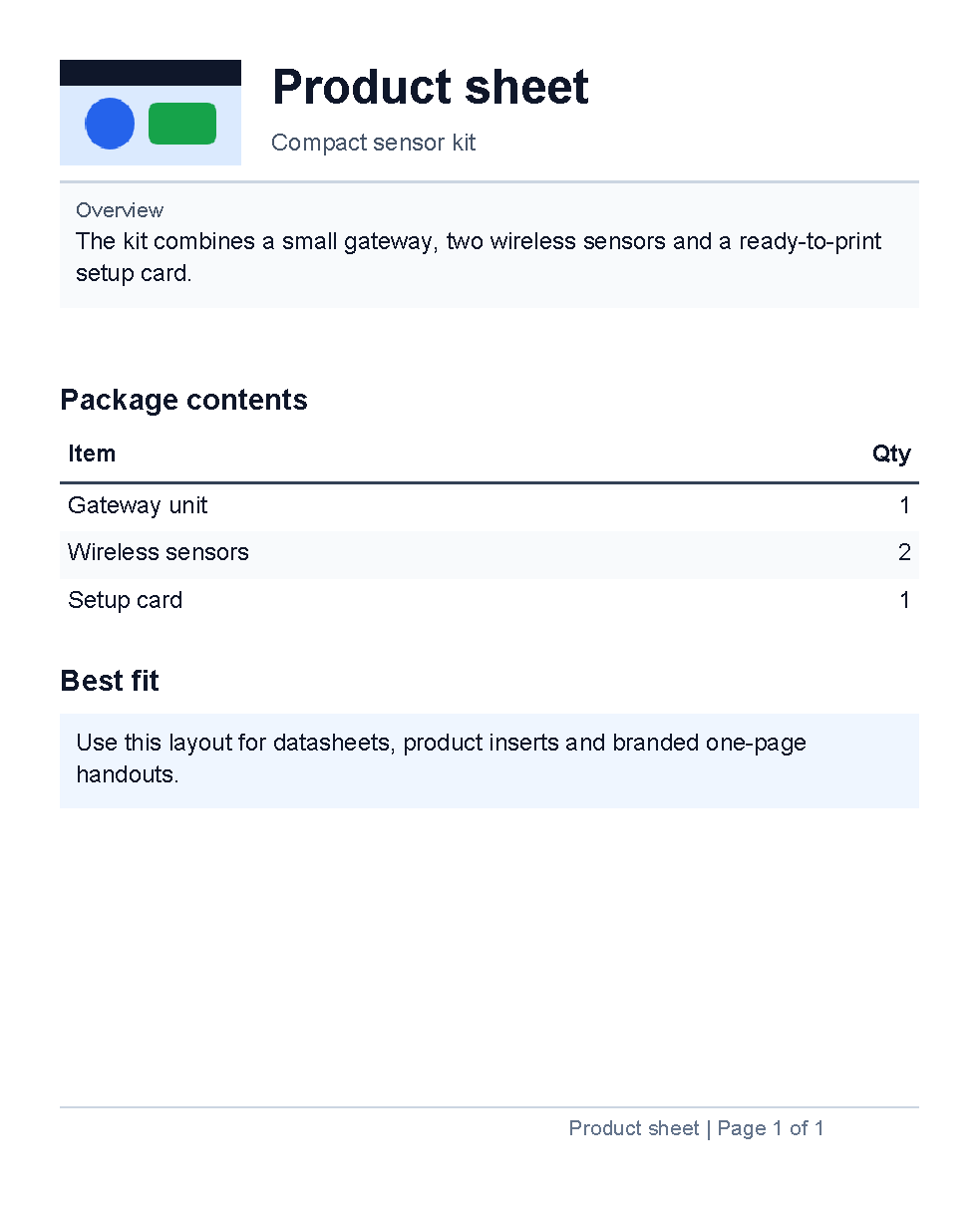
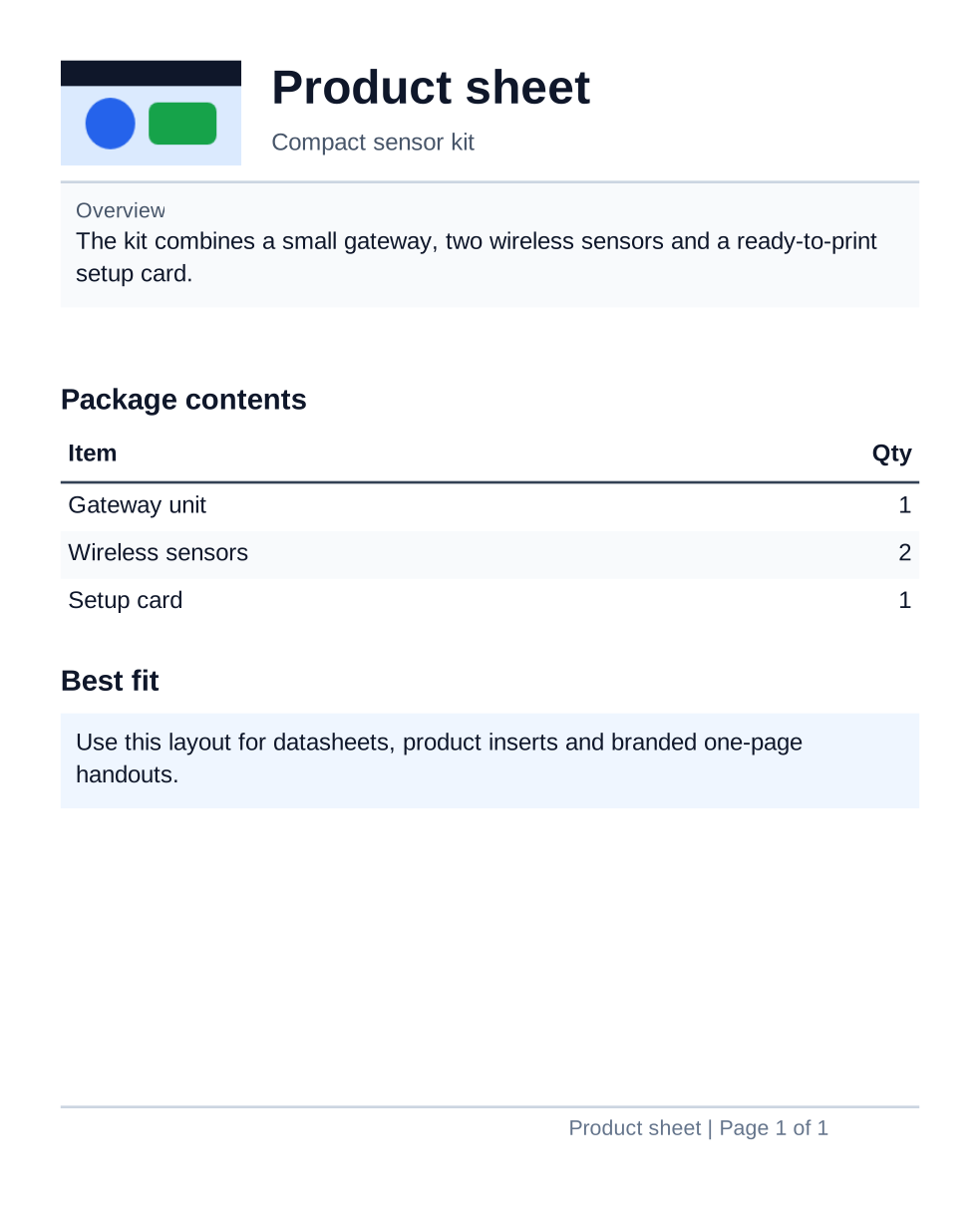
This example combines smaller topics from Template data, Image control, Border control, Line control, Table control and Page number control.
Chart Dashboard Example
Use this example when you need a short dashboard page with summary numbers, one chart, supporting values and a footer. It uses literal values so the chart XML stays visible and easy to compare with the rendered preview.
<?xml version="1.0" encoding="utf-8"?>
<template>
    <template.style>
        <text fontsize="9" foreground="#0f172a"/>
    </template.style>
    <header>
        <text fontsize="18" weight="bold">Sales dashboard</text>
        <text foreground="#475569">Weekly order trend and channel mix</text>
        <line thickness="1pt" length="100%" color="#cbd5e1" margin="0 2mm 0 0"/>
    </header>
    <body>
        <table margin="0 0 0 4mm">
            <tr>
                <td width="1*">
                    <border background="#ecfeff" padding="2mm" margin="0 0 1mm 0">
                        <text fontsize="8" foreground="#475569">Orders</text>
                        <text fontsize="16" weight="bold">326</text>
                    </border>
                </td>
                <td width="1*">
                    <border background="#f0fdf4" padding="2mm" margin="0 0 1mm 0">
                        <text fontsize="8" foreground="#475569">Revenue</text>
                        <text fontsize="16" weight="bold">48.2k</text>
                    </border>
                </td>
                <td width="1*">
                    <border background="#fefce8" padding="2mm">
                        <text fontsize="8" foreground="#475569">Open leads</text>
                        <text fontsize="16" weight="bold">41</text>
                    </border>
                </td>
            </tr>
        </table>

        <border background="#f8fafc" padding="2mm" margin="0 0 0 4mm" verticalAlignment="top">
            <text fontsize="8" foreground="#475569">Summary</text>
            <text>Orders rose through the week, with the web channel carrying the largest share.</text>
        </border>

        <chart margin="0 0 0 4mm">
            <lineChart height="45mm" title="Orders by day" line-color="#2563eb">
                <data x="1" y="42"/>
                <data x="2" y="46"/>
                <data x="3" y="51"/>
                <data x="4" y="58"/>
                <data x="5" y="63"/>
            </lineChart>
        </chart>

        <text fontsize="11" weight="bold" margin="0 1mm 0 1mm">Channel mix</text>
        <table>
            <th borderThickness="0 0 0 1pt" borderColor="#334155">
                <td width="2*" padding="1mm">
                    <text weight="bold">Channel</text>
                </td>
                <td width="1*" padding="1mm">
                    <text weight="bold" horizontalAlignment="right">Share</text>
                </td>
            </th>
            <tr>
                <td padding="1mm"><text>Web</text></td>
                <td padding="1mm"><text horizontalAlignment="right">52%</text></td>
            </tr>
            <tr background="#f8fafc">
                <td padding="1mm"><text>Partners</text></td>
                <td padding="1mm"><text horizontalAlignment="right">31%</text></td>
            </tr>
            <tr>
                <td padding="1mm"><text>Direct</text></td>
                <td padding="1mm"><text horizontalAlignment="right">17%</text></td>
            </tr>
        </table>
    </body>
    <footer>
        <line thickness="1pt" length="100%" color="#cbd5e1" margin="0 0 0 1mm"/>
        <pageNumber
            mode="CurrentTotal"
            prefix="Sales dashboard | Page "
            delimiter=" of "
            fontsize="8"
            foreground="#64748b"
            horizontalAlignment="right"/>
    </footer>
</template>
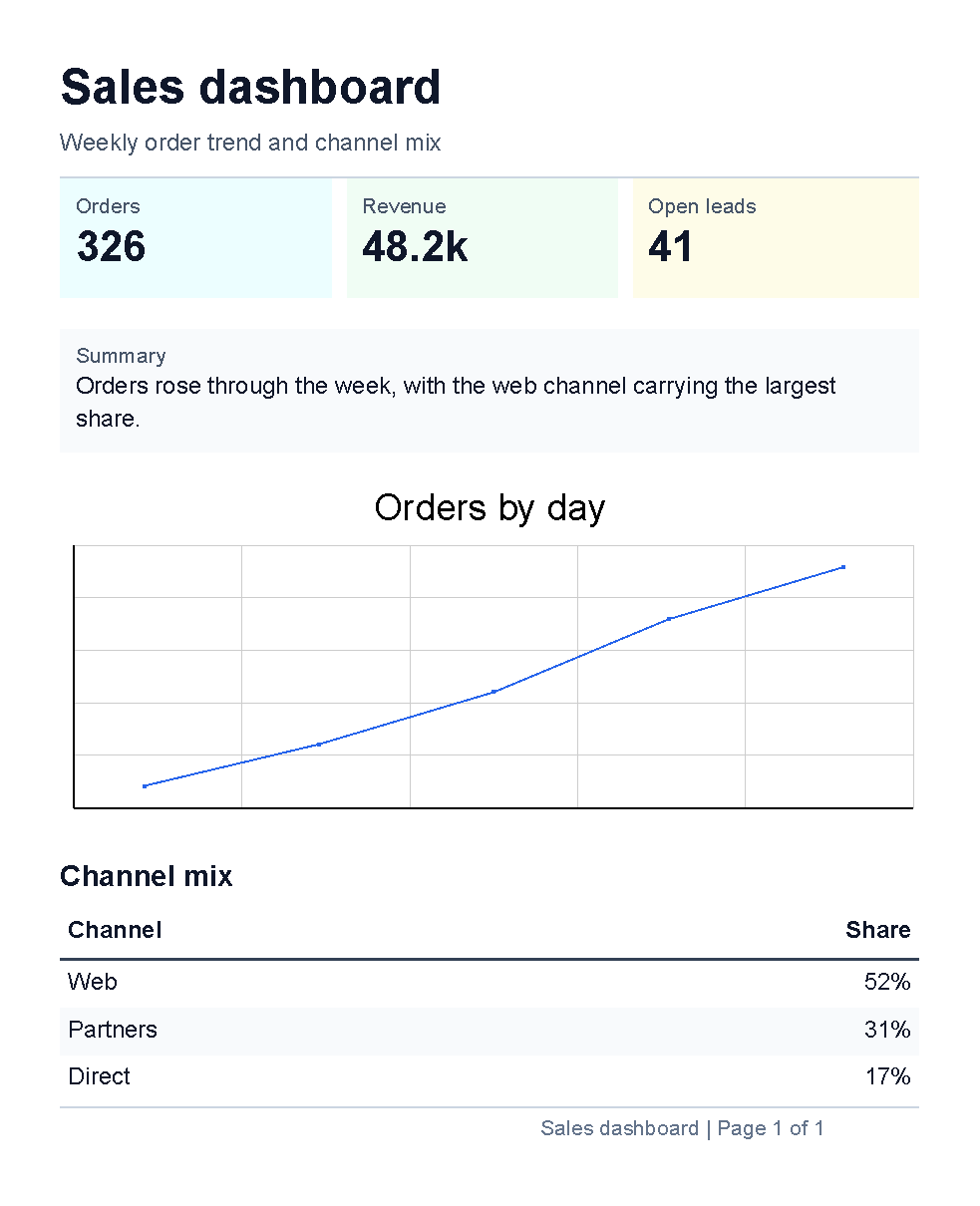
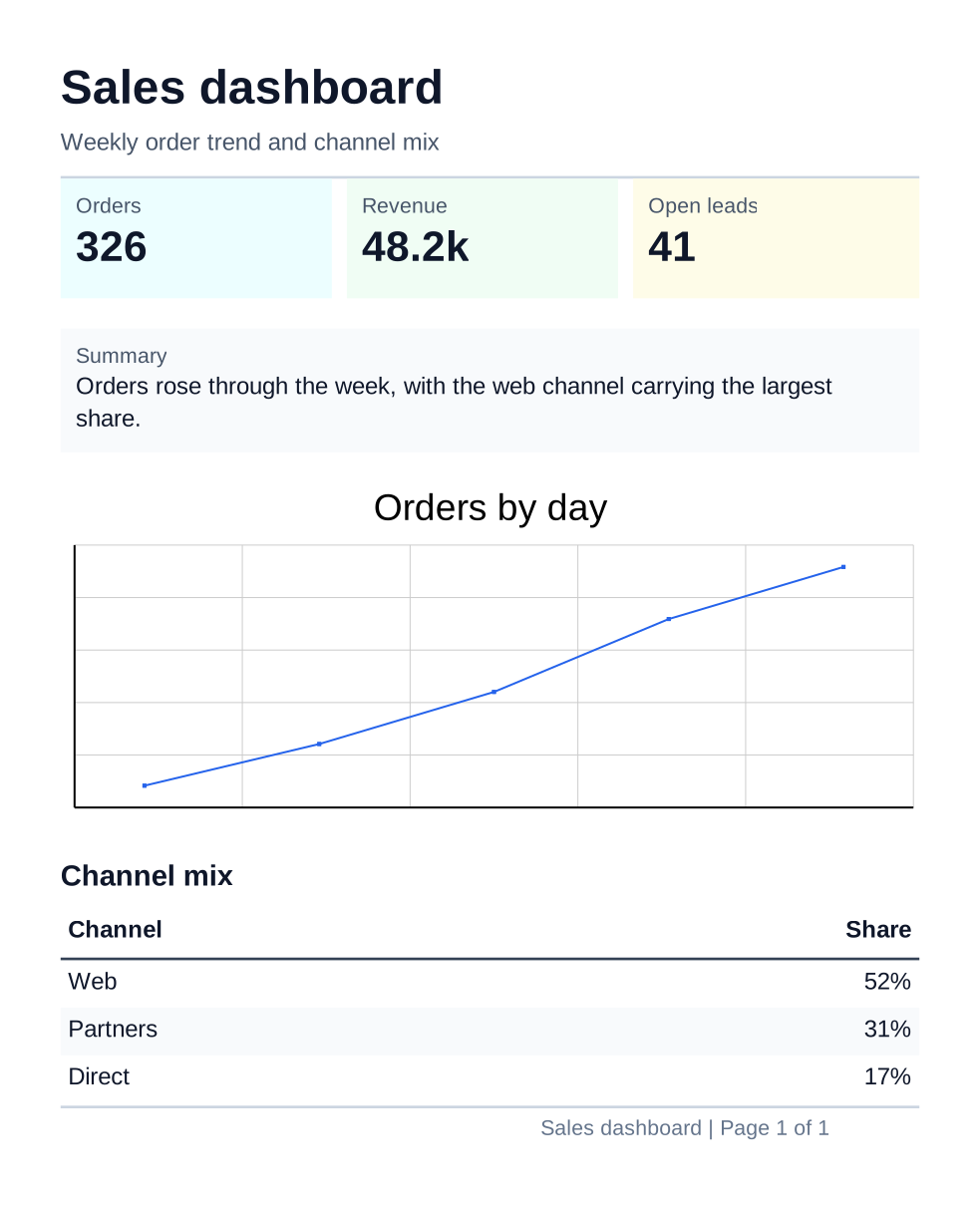
This example combines smaller topics from First document, Border control, Line control, Table control, Chart controls and Page number control.
Future Examples
- Add more complete examples when recurring document types are identified.
| Previous: Template language | Manual home | Next: Troubleshooting |