Papercraft Manual
User-facing documentation for Papercraft XML templates and the X39.Solutions.PdfTemplate compatibility bridge.
List Controls
| Previous: Flow helper controls | Controls | Next: Form and signing controls |
What Is This?
List controls render repeated list items with markers.
Use ul for unordered lists, ol for ordered lists and li for each item.
When Should I Use This?
Use lists when content is naturally a set of short repeated points.
Each li can contain normal controls, including nested lists.
Use table when the content needs rows and columns.
How Do I Start?
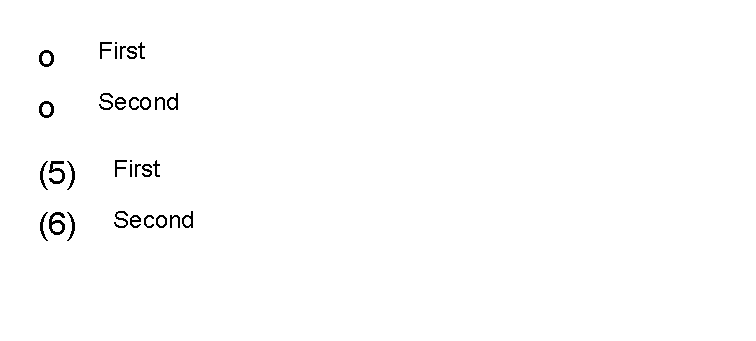
These fragments mirror ListControlTests:
<ul marker="circle" indent="8mm" markerWidth="4mm" itemSpacing="1mm">
    <li><text fontsize="9">First</text></li>
    <li><text fontsize="9">Second</text></li>
</ul>

<ol start="5" markerFormat="({0})" indent="10mm" markerWidth="7mm" itemSpacing="1mm">
    <li><text fontsize="9">First</text></li>
    <li><text fontsize="9">Second</text></li>
</ol>

Lists accept only li children.
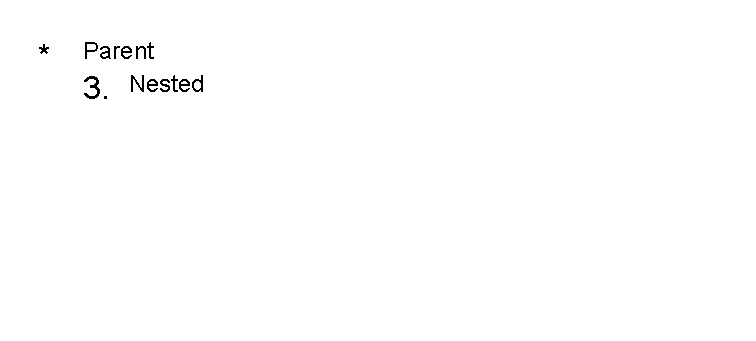
Each li can contain normal controls:
<ul>
    <li>
        <text fontsize="9">Parent</text>
        <ol start="3">
            <li><text fontsize="9">Nested</text></li>
        </ol>
    </li>
</ul>
Supported Controls
| Control | Children | Use |
|---|---|---|
ul |
li |
Unordered list with a repeated marker. |
ol |
li |
Ordered list with numbered markers. |
li |
Normal controls | One list item; can contain text, borders, nested lists or other normal controls. |
Supported Attributes
| Control | Attributes |
|---|---|
ul |
marker, indent, markerWidth, itemSpacing, shared layout attributes. |
ol |
start, markerFormat, indent, markerWidth, itemSpacing, shared layout attributes. |
li |
Shared layout attributes. |
ul marker accepts Disc, Circle, Square or None.
The current renderer uses simple text fallbacks for unordered markers.
ol markerFormat is a composite format, such as ({0}), that receives the item number.
For length values and shared layout attributes, see Layout fundamentals.
Common Mistakes
- Putting
textdirectly insideulorol. Wrap item content inli. - Using a list when the content needs aligned columns. Use
tablefor tabular content. - Expecting graphic bullet symbols. The current unordered markers are text fallbacks.
| Previous: Flow helper controls | Controls | Next: Form and signing controls |